Teams(Goals) Start Match
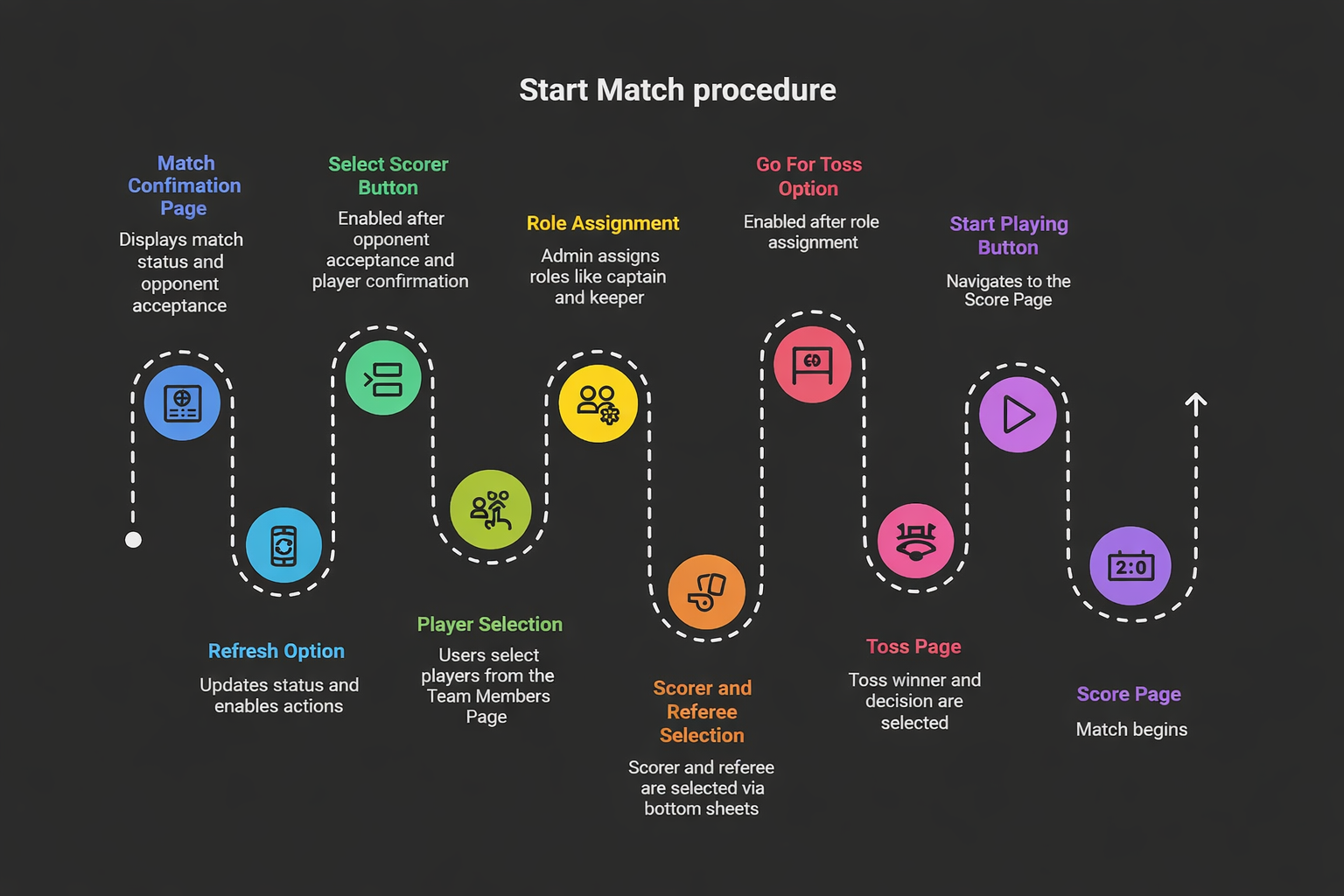
After a match is created, the user is taken to the Match Confirmation Page 📄.
💠 Match Confirmation Page -- Overview
- Shows "We will notify when opponent accepts" 🔔 with a Refresh icon 🔄
- By clicking the Refresh icon updates match status and enables actions like Select Scorer 👤✨
- A quick link: Go to Live Matches -- Click Here ▶️
- Leads to the Home Page 🏠
🗓️ Scheduled Matches
-
Displays Officials' status: Accepted ✅ or Requested ⏳
- Self & Opponent in a V/S Container 🆚
- Select Scorer button initially disabled 🚫👤
💡 Important Notes
- For Scheduled Matches:
- Referee & Scorer are pre-assigned 👨⚖️👤
- After the Scorer accepts, the Select Scorer button is hidden 🫥
- Go For Toss becomes available only to the scorer 🎲
- Officials list includes:
- Image 🖼️
- Name 🏷️
- Role 🎭
- Status Badge: Accepted / Requested
💠 Scorer Button -- Enable Conditions
- The Select Scorer button becomes enabled only when:
- The opponent accepts the match request 🤝
- All team (Self & Opponent) players confirm participation ✔️✔️
🔵 Select Players Button in V/S Container
- For Goal-Based Sports ⚽🏑🏀, both teams have a Select Players button.
- By clicking on it redirects to the Team Members Page 👥➡️
👥 Team Members Page
📍 Page Layout
- Displays players with:
- Profile Image 🖼️
- Player Name 🏷️
- Status Badge:
- Requested ⏳
- Accepted ✅
🔄 Status Update
- Once a player accepts, their status updates automatically from Requested ⏳ → Accepted ✅
🎮 Admin Player Selection
- Selected Players: Highlighted with a Green Border 🟩
- Already Playing Players: Highlighted with a Red Border 🟥
▶️ Continue Button
- Activates after selecting eligible players 💚
- By clicking on it redirects to Add Substitutes Prompt 🔄
- Back Icon ⬅️ returns to the Match Confirmation Page 📄
🔁 Substitute Selection Flow
❓ Prompt: "Do you want to add substitutes?"
- Yes ➜ Opens Add Substitute Page 🟢
- No ➜ Moves to Select Captain Page 🔵
🔄 Add Substitute Page
🧭 Navigation
- Back Icon ⬅️ returns to Team Members Page
👥 Player List
- Shows all players with updated statuses
- Allows selecting substitute players 🟡
- Next ➜ Goes to Select Captain Page 🧑✈️
🧑✈️ Select Captain Page
🧭 Navigation
- Back Icon ⬅️ returns to Add Substitute Page
🏅 Captain & Keeper Selection
- Dropdown options to choose:
- Captain (C) 🟦🅲
- Keeper (K) 🟨🅺
- Selected roles appear with special icons (🅲/🅺)
- Next ➜ Returns to Match Confirmation Page 🎯
- After that in Match Confirmation page the list view of selected players is displayed
1️⃣ Role Assignment
📝 Scorer Selection
- Opens a Bottom sheet: prompt "Choose who will score the match" 💬
- Selecting a scorer in listview and assigns them responsibility for digital scoring 📊
- Selected Scorer Highlighted with green border 🟩
⚖️ Referee Selection (Optional)
- Opens a Bottom sheet : Prompt "Choose the referee for this match"
- Select Referee in listview selected scorer highlighted with red border 🟥
- Referee supervises match fairness and Finish the match 👨⚖️
📌 Note
- In Scheduled Matches, Select Scorer is shown until the scorer accepts.
- Once accepted, the button is hidden 🫥.
🎲 Go For Toss
- Appears in Play Now matches after role assignment
- Shown only to the selected scorer 👤⭐
- By clicking Go For Toss it redirects to the Toss Page 🔄
🎯 Toss Page (Pre-Game Decisions)
🏆 Toss Result & Decision
- Displays Toss Won By 🎖️
- Winner chooses between:
- Goal post 🏟️(For Cricket)
- Kick 🎯
- Court 🏟️(For kabaddi)
- Ride 🎯
- Goal post 🏟️(For Cricket)
- First throw 🎯
▶️ Start Playing
- Activated after selecting the toss winner & choice
- By clicking it navigates to the Score Page 📊
🆘 Need Help?
💬 Contact our support team if you need clarification or assistance. 📩 support@sportzdom.com