▶️ Start Match – User Flow for Rank Sports
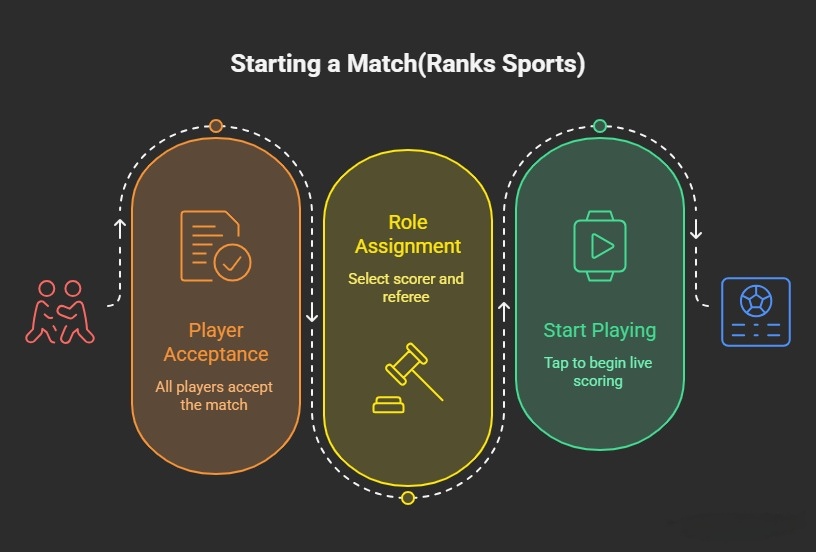
🔁 After Match Creation
- Once the user clicks Create Match 🎯,
- App navigates to the Match Confirmation Page 📄.
💠 Match Confirmation Page – Overview
- Displays message:
"We will notify when opponent accepts" 🔔 - A Refresh icon 🔄 is available:
- Clicking it updates the latest match status
👥 Participants Status
-
List of selected players is displayed 📋
-
Each player shows their current status:
- ✅ Accepted
- ❌ Rejected
-
A Delete icon 🗑️ is available:
- User can remove players if needed
🔄 Match Status Handling
- User clicks Refresh 🔄 to check updates
- Status updates based on player responses
✅ Enable Scorer Selection
- Once all players accept ✅:
- Select Scorer button 🎯 becomes enabled
🎯 Scorer Selection Flow
- User clicks on Select Scorer 🎯
- A bottom sheet ⬆️ opens with list of players 👥
- User selects any one player as Scorer ✅
- User clicks Confirm ✔️
- A success popup 🎉 appears confirming scorer selection
▶️ Enable Start Playing
- After scorer is selected:
- Start Playing button ▶️ becomes enabled
🧑⚖️ Referee Selection (Optional)
- User clicks on Select Referee (Optional) 🧑⚖️
- A bottom sheet ⬆️ opens with list of players 👥
- User selects a referee ✅
- User clicks Confirm ✔️
- A success popup 🎉 appears
🚀 Start Match
- User clicks Start Playing ▶️
📊 Post Start
- App navigates to the Score Page 📊
- User can start live scoring 🏏 / 🏸 / 🏀
🆘 Need Help?
Email support@sportzdom.com